Country and region
How your venue's country and time zone change what the till shows, and where each one is set.
Owners
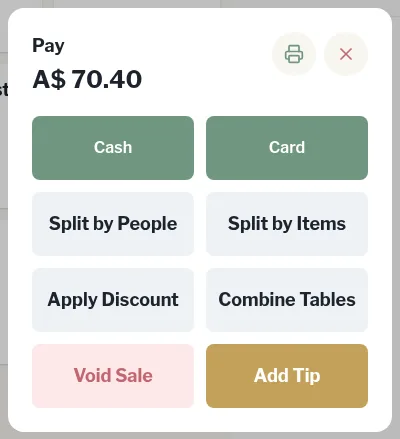
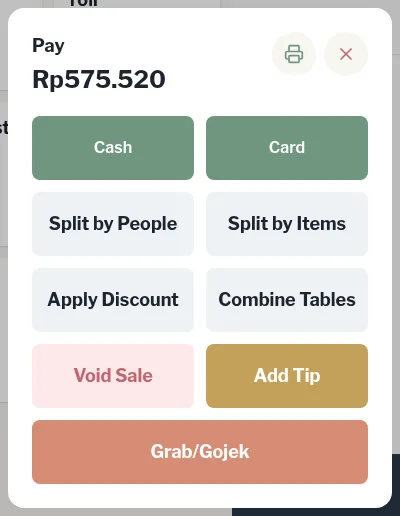
The till works for venues in Australia and Indonesia. A few things change with your venue's Country, and every time on the till follows your venue's Timezone.
Where it's set
Both are in Settings › Venue. See Venue settings.
- Country and Currency are locked. Live Hospitality sets them when your till is set up. Contact us if they're wrong.
- Timezone you can change yourself. Tap Save settings afterwards.
What changes for Australian venues
| Australia | Indonesia | |
|---|---|---|
| Currency | A$ | Rp |
| Default tax | GST 10%, also on the service charge | PBJT 10% |
| Grab/Gojek payment button, settlement line and filters | Hidden | Shown |
| Happy hour Rupiah off offer | Hidden. Use Percent off or Fixed happy-hour price | Shown |
| Discount amounts | Labelled Amount ($) | Labelled Rupiah |
| Indonesian contract types and payroll terms (PKWT, PKWTT, UMK, THR) | Hidden | Shown |
Everything else works the same.
Time zone
The till uses your venue's Timezone, not the tablet's clock, for:
- the clock and date in the top bar
- receipts, sales history, reports and the trading day
- rosters, timesheets and clock-ins
- happy hour periods and terminal locking
- email notices and the daily backup time
Where it matters, the short zone name shows next to the time, for example AEDT in Sydney in summer or WITA in Bali.